Which TON wallet to choose: Tonkeeper, MyTonWallet or Telegram
A wallet is where your GRAM and USDT live. There are many wallets, but only one choice really matters: who holds the key to your money — you or a service. That decides whether it can be frozen.
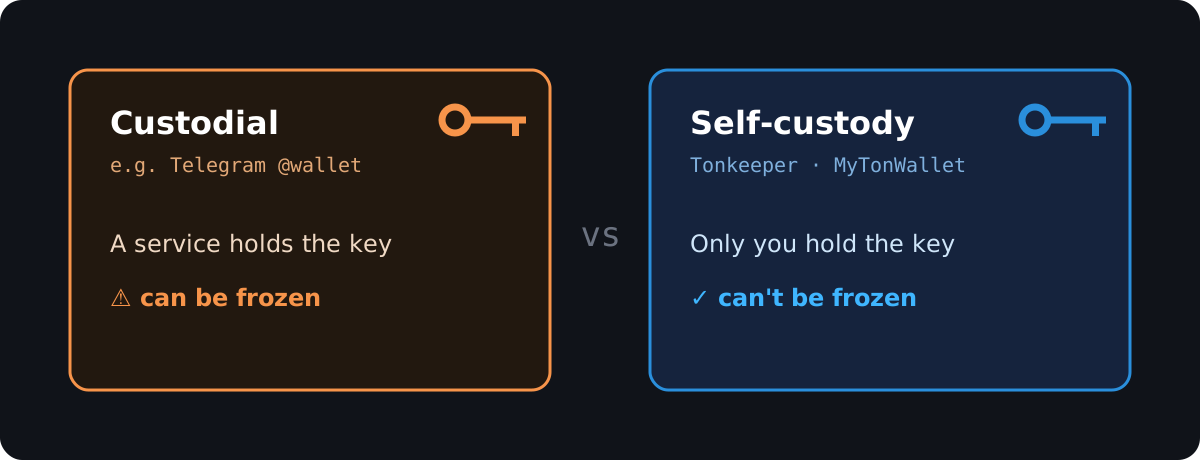
Custodial vs self-custody — the difference
- Custodial (e.g. the Telegram @wallet bot). A service holds the keys, not you. Convenient — no seed phrase to keep. But it's like a bank account: if the service locks your account, the money inside becomes inaccessible, and getting it back can be very hard.
- Self-custody (non-custodial). The key (seed phrase) is yours alone. Nobody can freeze or seize your funds. The responsibility is also yours: lose the seed phrase and no one can restore it.
⚠️ So don't keep meaningful amounts in a custodial Telegram wallet. For buying and holding, use your own wallet — here's which.
What to pick as a beginner
- Tonkeeper — the default choice. Built for TON, simple, available on iOS/Android and as a browser extension. Supports GRAM, USDT (jetton), staking, NFTs and paying in mini apps.
- MyTonWallet — a solid alternative. Open-source, has a desktop version, multi-account, staking, NFTs.
Both are non-custodial and free. For most people, Tonkeeper is enough.
Set it up in 3 steps
- Install the app from the official site (tonkeeper.com / mytonwallet.io) or your app store. The address is created for you.
- Write down the seed phrase (12/24 words) on paper and store it offline. It's the only way to recover the wallet.
- Done — you can receive GRAM/USDT and pay in one tap.
Seed phrase rules
- Never show it to anyone — not "support", not any form. Whoever knows the seed phrase owns the wallet.
- Don't keep it as a screenshot on your phone or in the cloud. Offline only.
- A legitimate service will never ask for your seed phrase. If someone does — it's a scam.
What's next
Got a wallet? Now put a little GRAM or USDT into it (see How to buy GRAM) and pay on Catallaxy in one tap.
Questions? Support: @catallaxy_support_bot.